
Use Earn
Earn provides a curated Wren view of selected Yearn vaults. It is a transaction interface, not investment advice. Vaults involve smart-contract, strategy, liquidity, and network risks. A displayed APY or TVL is not a promise of return, execution, liquidity, or safety.
Before you begin
Section titled “Before you begin”- Enable and connect the network for the vault. Earn supports Ethereum, Base, and Katana.
- Select an account with a signer when you want to deposit, withdraw, stake, or manage a cooldown.
- Keep enough native currency on that network for network fees.
Watch-only accounts can inspect positions but cannot transact. If Wren cannot use the account or network, Earn shows Select a signing account to transact., Watch-only accounts can inspect positions but cannot transact., or a network status message.
When a chain is disabled, its status is Enable this chain in Wren. When its RPC is not connected, its status is Wren is not connected to this chain. Select Manage networks in the status message to open network settings.
Check current Earn data
Section titled “Check current Earn data”- Open Control center.
- Select Earn.
- Use All, Ethereum, Base, or Katana to filter the vault list.
- Select Refresh to request current catalog data.
While data loads, Earn shows Loading curated Yearn vaults…. If no catalog is available, it shows Earn is unavailable. and Try again.
The current Wren catalog contains these products:
| Network | Product | Deposit asset |
|---|---|---|
| Ethereum | yvUSD, Flexible or Locked | USDC |
| Ethereum | USDS-1 yVault | USDS |
| Ethereum | WETH-1 yVault | WETH |
| Ethereum | Staked yBOLD | BOLD |
| Base | USDC Horizon yVault | USDC |
| Katana | vbUSDC yVault | vbUSDC |
| Katana | vbETH yVault | vbETH |
| Katana | vbUSDT yVault | vbUSDT |
Wren gets vault metadata from Yearn’s Kong service. Wren checks the metadata against its local catalog and policy before it enables a deposit. Wren reads balances, vault positions, simulations, and receipts through the configured RPC for each network. Earn does not swap or bridge assets and does not change a dapp’s network route.
Cards show Est. APY, Historical APY, or Unavailable, plus TVL and a risk label. The values come from current or historical Yearn data. Treat them as third-party data for review only.
If the catalog cannot be refreshed, Earn shows Showing cached Yearn data. New deposits are disabled; existing positions remain manageable. or Showing unavailable Yearn data. New deposits are disabled; existing positions remain manageable. An unavailable product is withdraw-only when Wren recognizes an existing position.
Deposit into a vault
Section titled “Deposit into a vault”- Select a vault card.
- Check the network, deposit asset, Est. APY, TVL, and Risk.
- For yvUSD, select Flexible or Locked under Choose how to earn.
- For a new yBOLD deposit, use the staked route. Wren finishes the deposit as staked yBOLD.
- Select Deposit.
- Enter an amount in the displayed asset, or select Max.
- Select Review Deposit.
- Review each Wren request. Check the account, network, target, asset, and amount.
- Approve the request in Wren and confirm it with the selected signer.
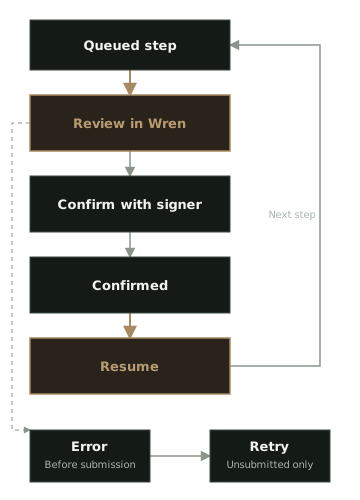
- After a step confirms, select Resume to queue the next step.
Some deposit routes need an approval. Wren requests approval for the exact amount. If an existing allowance is non-zero, Wren first shows Reset existing approval, then shows Approve exactly SYMBOL. Review both requests before you confirm them.
Every Earn transaction opens Wren’s simulation and signer review. A simulation is evidence from the configured RPC. It does not guarantee the result after the transaction is mined.
Withdraw from a vault
Section titled “Withdraw from a vault”- Select a vault with Your position.
- Select the position variant when the vault has more than one.
- Select Withdraw.
- Enter the amount in the displayed asset, or select Max.
- Select Review Withdraw.
- Review the simulation and signer request.
- Confirm the request with the selected signer.
- Select Resume after each confirmed step.
For direct vaults, an exact withdrawal uses withdraw. Max uses the full share balance with redeem. Wren fixes withdrawal loss tolerance at 0%. Earn has no loss-tolerance or slippage setting.
Withdraw locked yvUSD
Section titled “Withdraw locked yvUSD”Locked yvUSD has a cooldown and a withdrawal window. Wren reads the duration and window from the locked vault.
- Select Start locked cooldown.
- Enter the amount to prepare for withdrawal, or select Max.
- Select Review Start cooldown and confirm the request.
- Wait until the withdrawal window opens.
- Select Withdraw and confirm the two-step exit to USDC.
During an active cooldown, Deposit opens its amount form. Cancel cooldown remains available.
Earn shows Cooldown in progress, Your withdrawal window is open now, or The previous withdrawal window closed with the relevant times. Select Cancel cooldown only when you want to return cooling-down shares to the liquid locked position.
Manage yBOLD
Section titled “Manage yBOLD”New BOLD deposits finish staked as ysyBOLD. If you already hold unstaked yBOLD, select Stake existing yBOLD before you withdraw it. A staked withdrawal returns BOLD through the reviewed Yearn route.
Track a workflow
Section titled “Track a workflow”Earn shows each queued action in Earn activity. It processes one step at a time. Read the step label and status before you select an action.
- Select Resume when the next step is ready.
- Select Retry only for an unsubmitted step with an error.
- Select View transaction to open a confirmed transaction in the network explorer.
- Select Revoke approval when Wren shows a confirmed approval that the operation did not use.
- Select Recheck approval or Revoke again when Wren needs a separate allowance check.
- Select Close only when no approval remains to clean up.
Wren does not blindly retry a submitted transaction. If Wren cannot determine whether a request was broadcast after a restart, check the transaction on the network before you replace or retry it.
If a signer is unavailable, Wren shows Signer unavailable. Check the signer for the account, make the signer ready, and try again. A watch-only account cannot complete an Earn workflow.
For independent verification, use View on Yearn (external) and View vault contract (external) in the vault details. These links do not change Wren’s review requirements.